
This page contains brief instructions on how to use a digital lending on the Ebooks on EbscoHost platform from a PC.
It is always possible to consult the complete informations by Ebsco).
As an alternative to these instructions, Ebsco ebooks can be used on the go using the EBSCO Mobile app.
LET'S GET STARTED
1) The library will send you the link to the book purchased for you and present in the catalogue.
2) First, you must be connected to the University network or from home with the proxy.
3) Once in a while you will have to make a personal registration on the platform ebooks on EBSCO Host (MyEBSCO, see image below). Login and password you generate are also used to access the EBSCO Mobile app.

This is sufficient to enjoy the ebook via streaming without the option to download it in its entirety, or to download a limited number of pages.
To fully benefit from the digital lending, we recommend that you follow the next step (one-off)
Install on your pc the free Adobe digital edition software. Which is the tool that allows digital lending.
Once you have installed Adobe Digital Edition you will need to enable it on your PC by doing the following: on Adobe Digital Edition click on Help --> Authorize your computer. Use your Adobe ID, which you can generate here, it is not mandatory; you can enable your PC even without an Adobe ID. (see more info).
At this point you will be able to take advantage of the digital lending.
More info here.
4) You can now borrow the book in its entirety. The loan period is limited to 14 days and can be renewed.
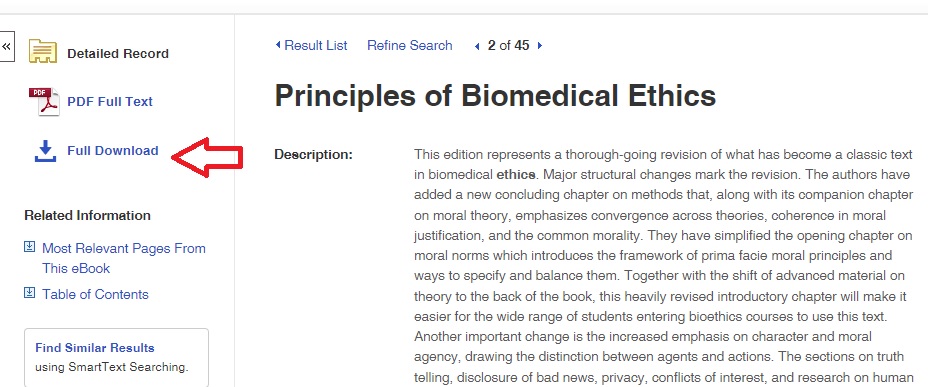
To borrow the book you need to click on "full download" (see image below) and download the book to your desktop. It is a file with .acsm extension.
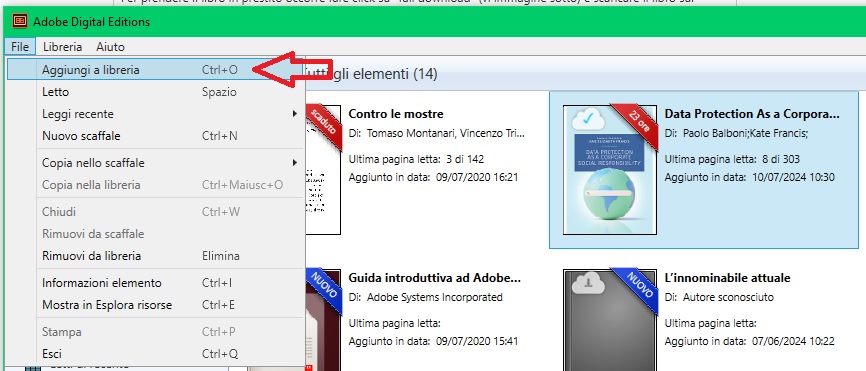
Then you need to go to Adobe Digital Edition. Click on File--> add to library (see image below) and recover the .acsm file saved on the desktop. This way, the book is incorporated into the Adobe library, where it can be used for the entire duration of the lending.
Lending renewal
After a maximum of 14 days, the digital lending expires and the book is no longer available. The ebook can be borrowed again using the same procedure described in point 4. It can be useful, before borrow the same book again for another 14 days, remove expired book from your Library in Adobe Digital Editions (right click on your mouse --> remove from library).
For more informations please contact bibliomedfarm@unige.it